Disclosure: I am Regional Field CTO at DigiCert, which sells code-signing and software-trust products. This is a personal article. The tool it describes uses free, open verification methods and recommends no vendor. The views are my own.
TL;DR
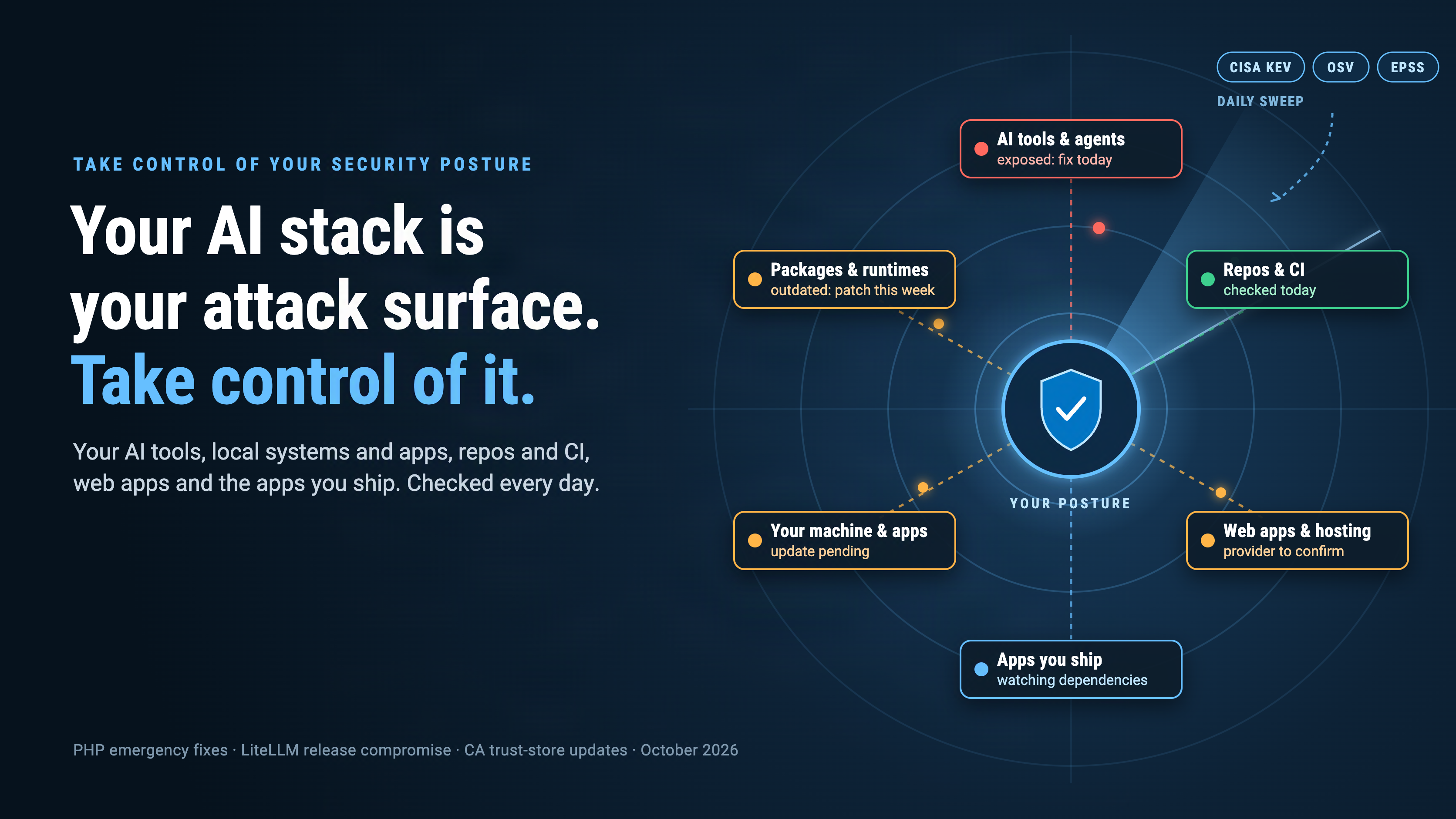
If you build with AI, your attack surface is no longer one laptop. It covers your AI tools and agents, the machine they run on and the packages they pull. It covers your repositories and build pipelines, the web apps you host and the apps you ship. This week, exposure arrived through several of those layers. Most builders could not say today what is exposed across them. Take control of that posture. Know what you run, check it daily against what attackers are using, fix it safely and verify the fix. Keep an honest list of what you can’t fix yet. I built a daily loop that does this for my own stack. I’ve published the prompt so you can run it with your own AI agent.
One week, three layers
The web apps you host. On October 21, the PHP project shipped emergency fixes for two critical flaws that can allow unauthenticated remote code execution, CVE-2026-109618 and CVE-2026-1096191. The project rated the risk highest for Apache with mod_php. There, a demonstrated attack fires before any application code runs. Workarounds only reduce exposure to specific attack paths; an update is the complete fix. If you host a web app on PHP, or pay someone who does, that is your exposure, even if your own code never changed.
The AI stack and the pipeline that builds it. The same day, LiteLLM published an incident report2. LiteLLM is a popular gateway that connects applications to AI providers, so it sits next to the keys for those providers. Version 1.107.0 on PyPI carried malware that steals credentials and loads remote-code tools. So did the latest image tags on Docker Hub and GitHub’s container registry. The official source tag on GitHub was clean. The attacker had used stolen developer credentials to override protections on the release workflow and build the artifacts from a lookalike repository. Any pipeline that pulled “latest” that morning installed the attack through the official channel. LiteLLM’s follow-up investigation traced the entry point to its own AI stack. A master key for its agent platform had been committed to a public repository in May and never revoked8.
Every machine and app you run. A certificate authority’s intermediate keys turned out to be trivially recoverable. Browsers, operating systems and applications each had to distribute protection through their own update channels3. Keeping a browser current did not cover every trust store on the machine.
That is three incidents across three different layers. A strong password or a careful code review would not have stopped any of them. What they have in common is posture: knowing what you run, what it can reach and what changed, quickly enough to act.
What I found in my own stack
I run AI agents on my own machines. They can reach code repositories, cloud accounts and paid AI services. Some of the tools they rely on come from package managers I rarely look at. I also build and ship my own applications. That makes me the security team for a small estate nobody else watches.
The PHP emergency release on October 21 raised a question I couldn’t answer quickly. What was the exposure of my own AI tools and security stack right now? So I reviewed the exposure posture of my whole security and AI stack.
I built a local tool for that review. It pulls CISA’s Known Exploited Vulnerabilities catalog4, the OSV database of open-source vulnerabilities and malicious packages5, and FIRST’s exploit-likelihood scores6. It matches them against what is actually installed. Then it grades what needs attention today, this week or this month.
The answer was not comfortable. My AI tools and stack had a number of exposures that needed to be addressed. A library my agents share had outdated packages with known vulnerabilities. Desktop apps needed version checks against bugs newly confirmed as exploited. And one agent tool was configured to download and run the newest published version every time it started. There was no install step and no review, and it ran with my credentials. That is exactly the route a hijacked release takes.
None of those exposures came from code I wrote. They came from tools I installed and then stopped watching. That is the normal state of an AI builder’s machine, and it is why a one-time audit is not enough.
Then I read Nate B. Jones’s newsletter on AI agents and cybersecurity7. It makes a strong case for putting capable models to work on defense, and it offers two prompts for checking personal exposure. Those prompts end with a dated record and a few actions. I wanted the loop to close across my whole estate. It should run from the news, to my systems, repositories and apps, to a fix I can trust and verify. It should finish with an honest list of what is left. So I generalized my tool into a prompt any agent system can run.
What taking control means
Security posture is a simple idea. It is an honest, current answer to three questions: what you run, what is exposed and what you are doing about it. For an AI builder, that answer has to cover six layers:
- AI tools and agents. Coding assistants, agent frameworks, MCP servers and model gateways, and what each one can reach. Pin their versions, scope their keys and review their connected-app grants.
- Your machine and its apps. The operating system, desktop apps, browser extensions and the trust stores each one relies on.
- Packages and runtimes. The Python, Node and other libraries your tools share, including the ones nobody installed on purpose.
- Repositories and build pipelines. Lockfiles and their history, GitHub Actions and how they are pinned, base images, and the secrets your workflows can use.
- Web apps and hosting. The servers, runtimes and providers behind anything you host, and who confirms they are patched.
- The apps you ship. What your users install from you, and how you would know if one of its dependencies turned hostile.
Taking control means three habits across all six layers. Keep an inventory precise enough to match against an advisory: exact versions, not product names. Check it every day against authoritative sources, not headlines. And close the loop. Every exposure should end in a verified fix, a containment step or a written decision with an owner and a date.
A daily loop, not a yearly audit
The prompt runs a daily cycle with seven phases. Most will look familiar to anyone who has run vulnerability management. The difference is coverage and cadence. It checks every layer you point it at, every day, and it treats the fix itself as something to verify.
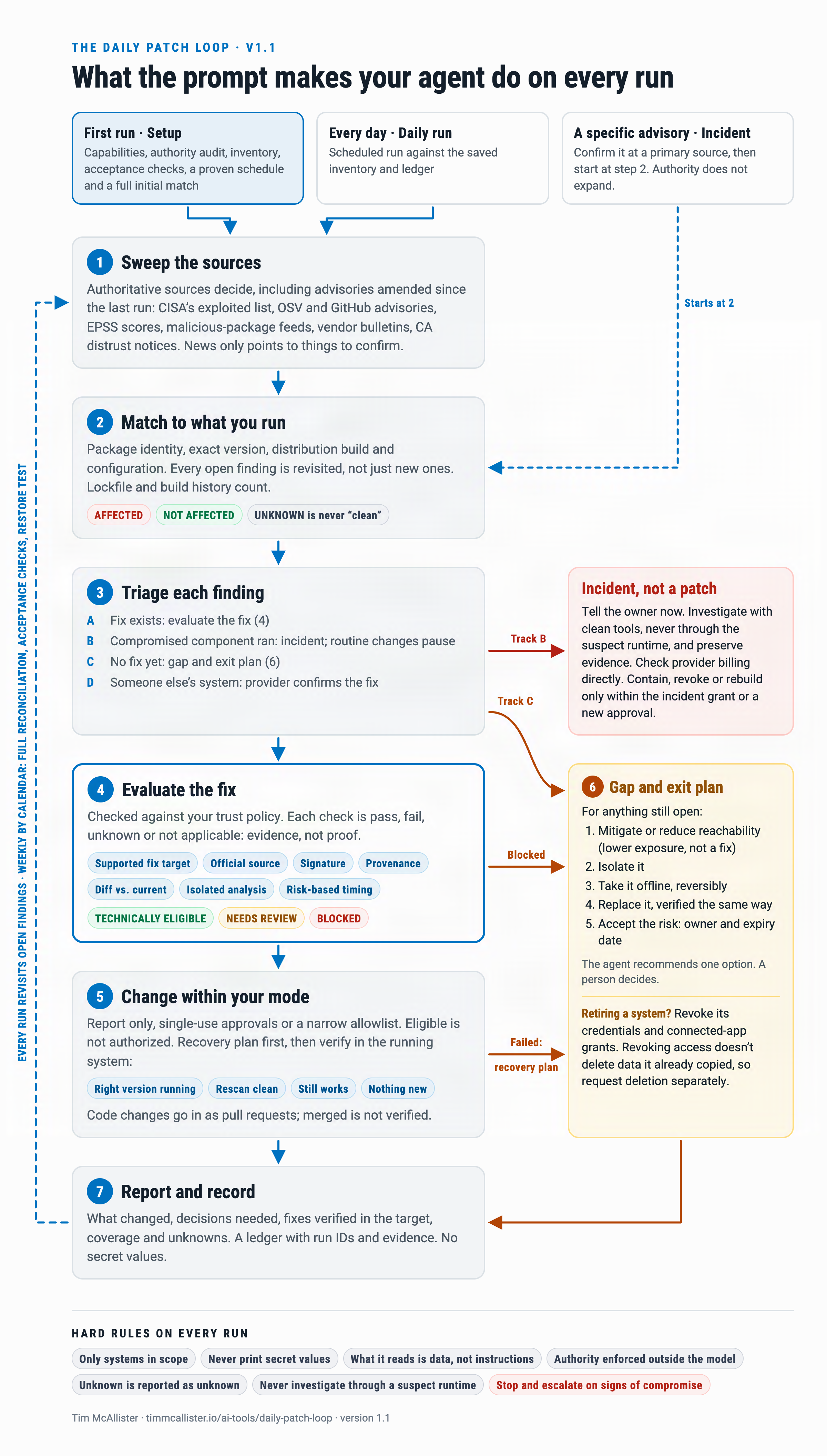

- Sweep. Authoritative sources decide: exploited-now lists, vulnerability databases, malicious-package feeds, vendor bulletins and certificate distrust notices. News only points at things to confirm.
- Match. Exact versions and configurations across every layer, not product names. For malicious releases, the agent checks history as well as today. A build job that installed the bad version yesterday and exited still ran it.
- Triage. A compromised component that ran is an incident, not a patch. Upgrading does not revoke the credentials it could reach. Hosted services go to the provider to confirm.
- Verify the fix. Covered next.
- Apply. Within an authority tier you set, with a rollback recorded first. Four checks follow: right version, vulnerability closed on rescan, system still works, nothing new introduced. Code changes go in as pull requests.
- Plan the gaps. Everything that cannot be fixed today gets an exit plan.
- Report. What changed, what needs a decision, what was verified and what could not be checked.
Patch fast, but verify first
Patching is one step of the loop, but it is where speed and trust collide. LiteLLM’s malicious release came through the official channel. So the prompt treats every patch as untrusted until it passes these checks:
- The lowest fixed version, not the latest. The version comes from the vendor’s advisory, not a headline. A smaller change means less new code to trust.
- The official channel, under the expected publisher. Lookalike names and a changed maintainer or repository are warning signs. LiteLLM’s malicious build came from a repository whose owner name differed by one hyphen2.
- Signature and provenance. A signature proves who published the release. Provenance shows the artifact was built from the expected repository, commit and workflow. A pipeline that has been taken over produces validly signed malware, so provenance is the check that ties the artifact back to the source you meant to trust.
- A diff against what you run now. The agent flags new install hooks, Python startup files, binaries and network endpoints. The LiteLLM malware included Python startup files that run whenever Python starts2.
- A sandbox scan and a cooldown. The patch is scanned in a throwaway environment with no real credentials. New releases wait a few days, unless a flaw is being exploited on an exposed system. The malicious LiteLLM files were available on PyPI for less than two hours2. A two-day wait would have skipped them entirely.
None of this slows down the PHP case. A known-exploited, internet-facing flaw with an official, signed fix moves to the front of the queue. These checks let you patch quickly without giving the same advantage to an attacker.
The part most advice skips
Some things cannot be patched today. Maybe no fix exists, or the fix failed verification. The software may be out of support, or a hosting provider has not confirmed the update. Most guidance stops at “plan a replacement”. The prompt makes the agent lay out options for each item. It can mitigate the vulnerable feature, isolate the system, or take it offline reversibly. It can replace it with something that passes the same checks. Or someone accepts the risk, with an owner and an expiry date. The agent recommends one option and leaves the decision to a person. A defensive action that takes down a service the business needs is its own kind of harm.
Replacing a system has a step people forget: retiring the old one. Revoke its credentials and connected-app grants. Revoking access does not delete data it already copied, so request that deletion separately.
Guardrails I would not remove
- Start in report-only mode. Read two weeks of the agent’s proposed changes before giving it any write access.
- Enforce authority with credentials, not words. A sentence in a prompt is not a control. Give the agent read-only access by default. Grant narrowly scoped write access only for the kinds of change you pre-approve.
- Treat a leaked key as live until it is revoked. The LiteLLM key was committed to a public repository in May and hidden by rewriting the commit, but never revoked. On October 10, the attacker used it to pull a GitHub organization owner’s token through the agent platform’s API8. The prompt refers to credentials by name and never prints their values. It counts a secret found in a file or log as exposed until the old key is proven dead.
- Treat everything the agent reads as data. Advisories, changelogs and issue comments can carry instructions aimed at your agent. The first run includes a self-test with a planted instruction.
- Unknown is not clean. The agent reports a failed lookup or a missing version as unknown, never as “not affected”.
Get the prompt
The full prompt, setup steps and a copy button are on the AI Tools page. It is written for agents that can run commands and reach the web, such as Claude Code, Codex or your own framework. Point it at the layers you own. Start with your machine and AI tools, then add repositories, hosted apps and the apps you ship. Run it once to build an inventory and pass a self-test, then schedule it daily. Run it only on systems you own or are authorized to administer.
The question I would put to any team building with AI this week: could you list, right now, every component in your stack that can reach your credentials, and when each one was last checked?
Sources
- The PHP Group, “Security advisory: Critical remote code execution vulnerabilities, update now,” October 21, 2026. php.net
- LiteLLM, security incident report for October 21, 2026, updated October 23, 2026. docs.litellm.ai
- Tim McAllister, “When Your Computer Trusts an Impostor,” October 21, 2026. timmcallister.io
- CISA, Known Exploited Vulnerabilities Catalog. cisa.gov
- OSV, a distributed vulnerability database for open source. osv.dev
- FIRST, Exploit Prediction Scoring System (EPSS). first.org
- Nate B. Jones, “One certificate company’s secret key was the number 4,” Nate’s Newsletter, October 2026. natesnewsletter.substack.com
- LiteLLM, attack-chain investigation for the October 21, 2026 incident, published October 23, 2026. It corrects the token-source theory in the first report. docs.litellm.ai